
Curricular internship – Guide to activation and closure
This guide is intended for students enrolled in DEI degree programs who need to activate or complete an internal internship (within the Department) or external internship (in a company/organization).
Requirements
- Mandatory workplace safety training: before starting work, it is mandatory to have completed the safety course and obtainedthe certificate. It is mandatory to attach it to the application to start work.
- Department Teams: join the group “DEI – INTERNSHIP” on Microsoft Teams with the code:
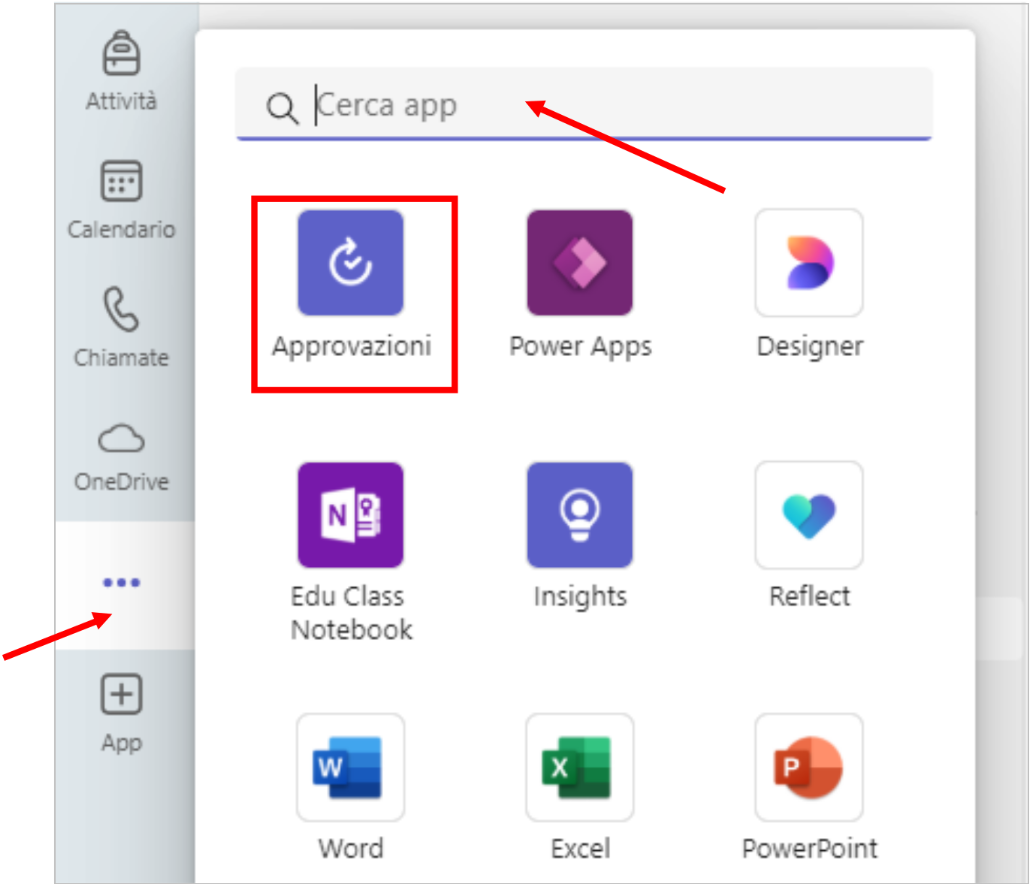
vx7cbi1. - App "Approvals" in Teams: if you don't see it, click on the three dots → search for "Approvals" → activate it (see screenshot)
Choice of internship
Activation
- Open the form START internal internship – DEI (Teams → Approvals).
- Attachthe safety coursecertificate.
- Filling in the main fields (view the screenshot)
- Name of the request: write
AVVIO tirocinio interno – Cognome Nome. - Approval managers
- Poliba tutor (teacher): enter the name of your tutor.
- DEI Academic Office: names are preset (cannot be changed).
- Name of the request: write
- Submit the request. Approval follows the order: Poliba Tutor → DEI Secretariat.
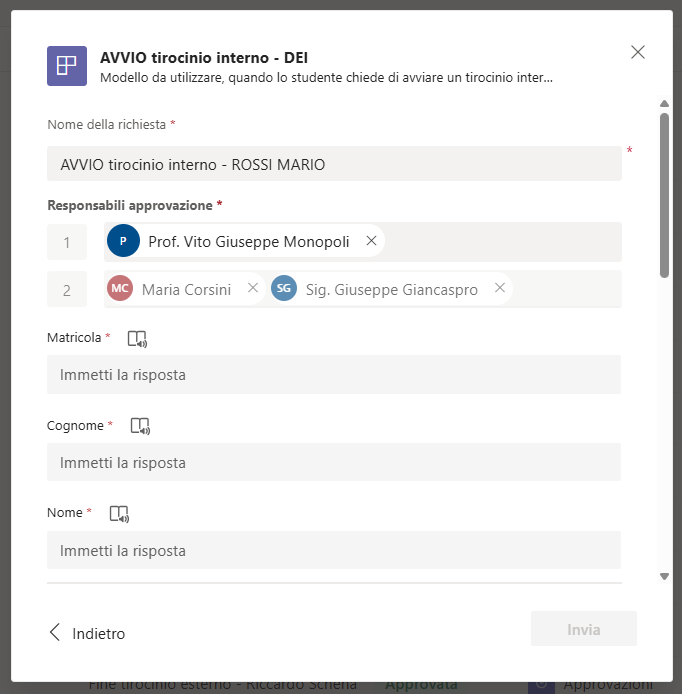
Secretarial contacts: Dr. Maria Corsini, Mr. Giuseppe Giancaspro.
- Follow the University procedure on "Internships for students" and fill in the required documentation.
- Do not use the DEI's "START" form for external internships: activation is only possible via the University website.
During the internship
- Whether you are doing an internal or external internship, keep track of the activities you have carried out in order to prepare your final report.
- If external internship: in addition to the report, fill in the attendance register of the organization signed by the company tutor (this will be needed at the end).
Approximate duration of the internship:
- 3 credits = 75 hours ≈ 1 month
- 6 credits = 150 hours ≈ 2 months
Closure (internal and external internship)
To conclude the internship, always use the form END internship DEI (internal and external) on Teams → Approvals.
- Open the form END of DEI internship (internal and external).
- Fill in key fields (view the screenshot):
- Internship start date (retrieve it from the Approvals history).
- Number of credits (3 or 6) to speed up verification by the registrar's office.
- Name of the request:
FINE tirocinio interno/esterno – Cognome Nome.
- Approval managers (in order):
- Poliba tutor (lecturer): to be added.
- Course Coordinator: to be added (coordinators are listed on the course page).
- DEI Secretariat: preset names (cannot be changed).
- Required attachments (view the screenshot):
- Internal internship: final report in PDF format.
- External internship: a single PDF file containing the final report + attendance register signed by the company tutor.
- Outcome:
- If the tutor evaluates positively → approves.
- If the report is insufficient → reject; in this case, you will need to update the report and resubmit it.
After approval of the final report, register on ESSE3 for the internship transcript, according to the procedures defined by the Degree Program Coordinator.